Cool products
PERSONAL
Hair loss

HOME
Ant traps
Mosquitos
Camcorder
Tires
Electric car
Phone system
Audio and lighting system
Remote controls
Internet service
Oven

BUSINESS
PDA
Voice recorder
Cell phone

COMPUTER GEAR
My home system
Misc computer stuff
Digital camera
Digital camera software
FAX, copier, scanner
Photo printer
Graphics card
Flat panel display
Video camera
CD recorder
Removable storage
USB
Voice recognition


Here is a list of some of the products I use that you might find useful yourself, along with a list of pros and cons.

PERSONAL

Hair loss
I started using Rogaine 5 years ago when I still had hair. Look at me now. Yeah, you got it.... it didn't work, did it? Turns out, I'm not alone. 35% of the folks who use Rogaine will end up like me. On the other hand, less than 1% of the users of Propecia will continue to lose hair. The rest will either stabilize or grow more hair. Check out this article on hair loss in the British Medical Journal or the clinical results on the Propecia web site. The key row is the "Decrease" row. Check it out. If you want to keep your hair, switch to Propecia. Your pharmacist will also tell you that once Propecia hit the market, sales of Rogaine have dried up. No surprise. But there is some promising research on hair loss being done right now, so I'm optimistic.

HOME

Killing ants in the house
Boric acid mixed with sugar and water and doused on cotton balls used to be my favorite, but it is messy, hard to clean up, and you have to keep it moist. My new favorite is the FMC: Products: FMC Ant Control Baits: FluorGuardŽ. $10 for 6 stations. See U Spray to order. These are really killer compared to the RAID stations you buy in supermarket (which don't seem to work at all). The ants really go for the FMC stuff and are all gone in a few days (sometimes a week) with no messy/harmful chemicals. I also recommend having a professional spray the exterior perimeter of the house to keep the ants away. These traps are all you need inside the house.

What's really cool is that a mixture of dish detergent and water which I put in a spray bottle will kill ants on contact, discourage them from coming back, and is completely non-toxic!

Mosquito repellant
DEET is the best way. See this article, and this one. On 20/20, sonic repellers got only a 27% reduction. Lots of studies have shown citronella is useless, others show it marginally useful.

See also the Mosquito Magnet. Expensive, but a lot of folks are giving them the thumbs up. http://www.mosquitomagnet.com/main.html has info.

Camcorder
Get the SONY DCR-PC100. It's expensive ($2000) but worth every penny. I bought mine at Cameraworld of Oregon over the phone. I got it 2 days later. No sales tax.

Likes:

  • Lightweight, small, works incredibly well, even in  low light.
  • Optical image stabilization
  • IEEE Firewire interface
  • Digital video (DV) so you can copy
  • Tells you how much battery life you have left
  • DV input so you can make copies of your tapes if you have another camera. No loss of resolution when you make a copy.

Dislikes:

  • None really and I'm really picky. I rarely find products without dislikes.

Tires
Go to the Tire Rack. Search by size. I bought my NSX tires over the net from them. You can save major bucks this way. I had my tires directly shipped to a local installer who charges $25 per tire to mount and balance. The sales guys knew more about the NSX tires than my Acura dealer.

Electric car
GM's new EV1 is a very cool vehicle. Accellerates as fast as my NSX! No oil, no tuneups, no gas. Environmentally friendly.  We were going to lease one, but they had a raffle and my wife won a free lease for a year and we liked it so much, we are paying for the second year and upgrading to the 1999 EV1s when they arrive in our area.

Lots of new technology in this car... It goes about 80 miles before needing a recharge, but NiMH batteries available on the 1999 EV1s allow you to go over 175 mi and the heating and A/C work a lot better (and the batteries don't ever need to be replaced).

For more info, see my EV1 testimonial or the cool article in Forbes about the EV1 that features me. There's also an editorial in the San Jose Mercury News about EV1s and HOV lanes that mentions me.

The reason I drive the car is that I believe in protecting the environment and it is a lot cheaper (and healthier) not to pollute the environment in the first place, than to pollute and then clean it up.

I also recently test drove the tzero. This electric car is totally awesome. 0 to 60 in 4 seconds; 1 hour recharge time; a lot more control over regen and a 100 mile range on lead acid batteries. Here's a shot of me in the tzero.

Phone system
I've got a FLASH voicemail system ($2,500; just on the market) which works with my Panasonic KX-TD1232 Digital Super Hybrid System. Here is the datasheet on FLASH. I dumped it in favor of the Panasonic voicemail system which isn't a lot better, but it offered live call screening which I thought was pretty cool. The Panasonic voicemail system isn't very user friendly... I wish I had my Northern Telecom voicemail system at home!

Audio and lighting control
I have a Vantage lighting system and an Audio Ease Monaco audio control system throughout the house which is now replaced with the Phast Landmark system which interfaces to the Vantage system.

Remote controls
We used the Harman/Kardon Take Control remote control  (jointly designed with Microsoft) to control things. Once you program one, you can program them all via your PC! But we've replaced these with the Panja portable touch panels.

Internet Service
Covad DSL

Oven
Wolf FlashBake oven (microwave speed, conventional taste developed in Silicon Valley). Looked cool, but with 2 microwaves, we were set. My wife didn't want to give up the counterspace.


stk.jpg (27483 bytes)

Like the list?

If you found this list useful, let me know: stk@propel.com


BUSINESS

PDA
Get a Palm Pilot from 3Com. Use the Rayovac Renewal Rechargable Alkalines. I'm still using the same set of batteries after a year. I upgraded to Palm III to get the bigger fonts, better battery life, and faster sync.

Voice recorder
I'm constantly taking little notes, so a digital voice recorder is great. I currently use the Voice It recorder (I recently upgraded to the new voice-recognition-quality model  that comes with Dragon NaturallySpeaking Mobile see below) that hooks to your computer. I end up never using the computer interface, but there is a new model out that hooks into Naturally Speaking that has better voice quality.

Likes:

  • 4 named folders for storing voice messages
  • You can edit the names of the folders (unfortunately, requires a PC)
  • You can transfer the messages to your PC
  • You can insert at the beginning or end or anywhere in a message you've recorded
  • 2x or 1x playback speed
  • Easy to skip through messages
  • Extended memory card is same one that works in my digital camera

Dislikes:

  • The power on button is really flakey. If you send the unit directly back to them, they'll fix it.
  • Sound quality is marginally acceptable (I'd rather have better sound)
  • The labels on the buttons wear off after a month of use (some buttons have labels under them,  but the buttons you use most of the time have labels on the buttons themselves, so this is a real design disaster) so I use clear nail polish to prevent this
  • Only 100 messages per folder
  • Only 4 folders
  • User interface is rather clunky
  • You have to power it on before use (as opposed to just hitting the Record button)
  • It doesn't turn itself off automatically
  • Battery life seems pretty poor. This is because it drains the battery when OFF! So if you leave it sitting around for a month, and try to use it, don't be surprised if the batteries are dead.
  • I wish it were thinner/smaller.

Cell Phone
I have a Qualcomm Q-Phone and Sprint. PCS technology. But I ended up switching to GTE with StarTac phone since the rates were as good as Sprint, and the coverage was a whole lot better with GTE. Sprint has the advantage of a nationwide digital network so your voicemail indicator always works and you don't have to enable follow me roaming when you enter a new area.

Likes about the Q-Phone.

  • Rates are terrific. The $80 plan gives me 700 minutes anytime plus free roaming, and free long distance. You can't beat that.
  • Coverage is good, not great. It is covered just about everywhere I spend most of my time.
  • Voice quality is superb
  • Power output is adjusted relative to your distance to the cell site so that you conserve battery power if you are in a strong signal area. CDMA technology actually requires this to work.This is a benefit since it means less radiation of your body when it is up near your head.
  • Soft handoff of CDMA means highly unlikely to have a call dropped between cells

Dislikes on the Q phone:

  • May not work inside many buildings
  • People have left me voicemails that don't show up on the phone for 3 hours. Very odd.
  • Even though the phone is in range, it may not ring. I've been in my car and called my Q Phone from my other car phone and it didn't ring, even though the signal strength on the Q Phone was high.
  • The phone gets polled by the system every 10 minutes or so and has to respond. That means your body is unnecessarily exposed to the 2GHz signal.
  • Battery life sucks. I have poor reception in my office, so even without any outgoing calls, I often only get about 10 hours or so standby life. The Motorola GSM PCS phones don't periodically transmit and they get about 3 times as much standby on the same size battery.
  • My first phone had an inaccurate battery meter so I returned it and got a new one. You have to program over from scratch (unlike the Motorola GSM PCS phones which store your numbers on a credit card).
  • They apparently don't make this phone anymore.

COMPUTER GEAR

My home computer system
My personal computer at home is a custom, built-from-scratch computer with two Pentium II 450Mhz Processors and 256MB, 100Mhz 8 nanosec PC-100 memory on a ASUS P2B98-DS motherboard which has an integrated Adaptec Ultra-2 SCSI controller. An SGI 1600SW flat panel monitor (same as Bill Gates), with 4 operating systems (NT, Win98, Linux, Solaris), 2G internal Jaz drive,  DVD-ROM (which hardly works at all with the flat panel), 100Mb ethernet, and dual 18G drives stripped in RAID0, with a 9Gb boot disk with the 4 operating systems and a "common" area for exchanging files between the file systems. System Commander is used to switch between the operating systems.

Also, I don't recommend you try this yourself. It took several weeks to
configure this system. The only reason I do this is to gain first hand experience with all the major operating environments.

Misc computer stuff
Soundblaster Live! sound card. I have  4 operating sytems and use System Commander to choose: NT, Win98, Linux, Solaris System has dual Pentium CPUs and 256M.  DVD drive, Mouse Systems optical mouse, the very cool BlackoutBuster UPS from PK Electronics , and a have 2 18G drives that are RAID 0 stripped (NT access only), so if one drive fails, I lose both drives, but it is damn fast.

Digital Camera
I had the Olympus D-600L, then a Fuji MX-700 (which is smaller but the pictures are not as good), and finally, an Olympus C-2000 Z.

I also have a Kodak DCS-520 which I use for all my important pictures that I'm very happy with (see review below).


Olympus likes:

  • Olympus digital cameras are known for phenominal quality and this camera is yet another proof point. Except for red, these images are hard to distinguish from my (much more expensive) Kodak.
  • I usually shoot in 1024 x 768 mode usually and get 156 pictures for each 32Mb SmartMedia card. My prints are indistinguishable from film, even by a professional (without a magnifying glass).
  • Cost is super low once you buy the camera and a CD-R recorder like the HP. Since HQ pictures are 250Kb or less in size so you can put 2400 images on a CD-ROM for just $2. So with an effective marginal cost of less than 1/10 of a cent per shot, you can take a LOT of high resolution shots for next to nothing and store it for 100 years without degradation. You can't beat that. The low cost means you can take more photos.
  • Easy to archive/organize photos. You'll never misplace/lose a photo again.
  • You'll never scratch a negative again! Digital photos are unlikely to be damaged. I save out two copies to CD-ROM discs. At $2 for a CD-R disk, you can't beat that. So even if a CD is damaged or destroyed, I still have multiple backup CDs.
  • You only have to spend money if you want to print a photo. And printing is cheap. You can print for about 50 cents in ink and 50 cents for photo quality glossy paper. $1 for an 8 x 10 isn't bad!
  • You can digitally fix the photo easily (like the Adobe Photo Deluxe Instant Fix feature) before printing
  • Get the accessory kit with Olympus NiMH batteries and charger. Normal batteries won't last very long in this camera (about 50 shots), but these batteries seem to last forever.
  • The Olympus NiMH charger is really compact; great for travel, but the plastic door hinge is pretty flakey and lots of people have had it break off (including me).
  • A 32Mb memory card is available. Get that and the PCMCIA adapter (mine is a Microtech Digital FlashFilm). This let's me download from the camera to my laptop when I go on vacation. Note: The PCMCIA card will only be seen by your computer after the memory card is inserted. If you insert the card upside down, it won't work and you'll wonder why. Try inserting the card upside down if this happens.
  • Screen on the back allows you to see your pictures immediately. My kids go nuts over this.This reason alone is enough to get a digital camera. Plus, it allows you to get rid of pictures you don't like, minimizing the amount of times you have to download the camera.
  • No true through the lens view, but it seems close enough!
  • Very compact size, but not quite pocket size
  • 3X motorized zoom; built in flash; macro focus
  • You can see a slide show of your pictures immediately after transferring to computer
  • No more trips to the photo store
  • You save money and time
  • Very easy to delete the last shot you took
  • The effective "speed" of camera is pretty fast, like ISO 100 and F2. That makes it possible to shoot in a lot of cases without a flash.
  • Fast "recover time" between shots (especially in the 1024 x 768 mode)
  • You can zoom to 1:1 on the image on the view screen, so you can tell if the picture you captured is really in focus or not.

Dislikes:

  • The lens cap tends to come off too easily. Either make it a secure spring lock, or provide an attachment like the Sony camcorder so that it hangs down from the camera when it is off
  • Need a quick way to switch flash modes. I often want to do this quickly and it is relatively cumbersome (you must bring up a menu). I'd like it on a button.
  • You need to close it down a stop when shooting closeups with the flash to get the right exposure
  • If you have a tripod and want to shoot at night, you are out of luck. No manual shutter, but this has not been a problem.
  • It isn't cheap: $1200.

FUJI MX-700

Likes:

  • Fits in my pocket
  • Great auto focus, even in very low light
  • Easy to flip to different resolutions with one button
  • You can zoom on the thumbnail preview image (but not pan!)

Dislikes:

  • Flash is way under powered
  • You can't change the white balance except in manual shoot mode, and shooting that way is a pain because you have to confirm each image
  • No confirm tone when the exposure is finished
  • If you turn off the flash, then turn the camera off and on, the flash is re-enabled. That's a pain.
  • Single wide angle focal length. No zoom.

KODAK DCS-520

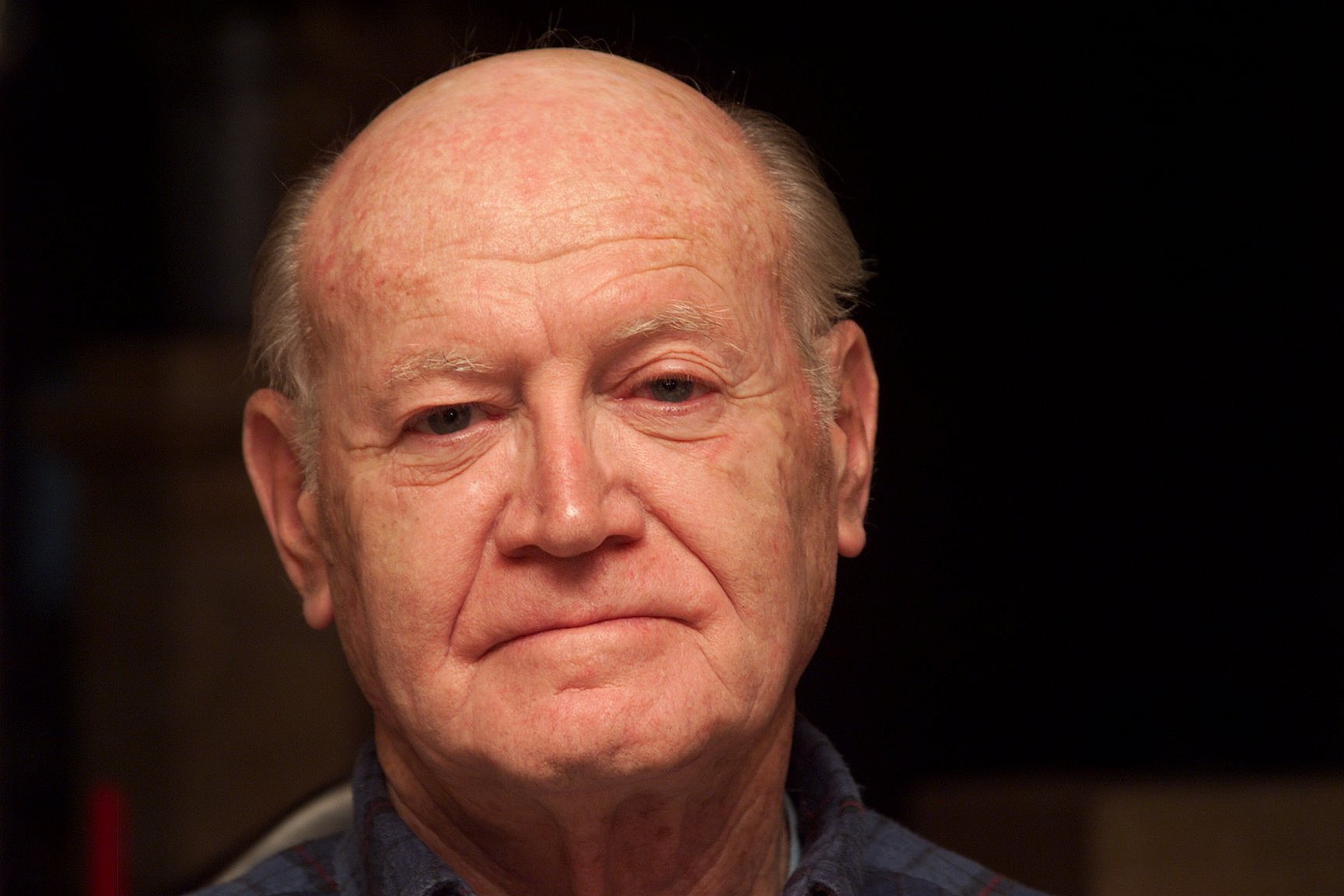
This is a killer camera. If you are a photo journalist, this is the camera to get. For personal use, I use it whenever weight/size/convenience are not a problem, e.g., at home, but not on a short trip. I've taken over 10,000 pictures with this camera in less than a year, so it was a real bargain, even though it cost $15,000. I saved on film and processing costs, and the images will last forever without degradation. Here's a picture I took of my father. Click on the image to see the original image at full resolution. Check out the detail!
Likes:

  • Fixes all my dislikes about the Olympus, e.g., Olympus needs flash indoors, poor autofocus accuracy, can't get autofocus indoors sometimes, long cycle time, only 24 shots per card, no manual focus if autofocus doesn't work
  • you can change ISO from 200 to 1600 from shot to shot. At 400 there is no grain. At 800 it is a bit grainy. At 1600 it is noticeably grainy. That means you can shoot indoors without a flash.
  • you can use regular Canon lenses and flashes! I use the 340EZ with E-TTL and pics are phenominal. For lenses, I have the new 28-135mm IS USM zoom lense, and a fixed 1.4 50mm lens.
  • auto focus is fast and accurate. You can pick auto focus point, or let the system pick from best of 5. Most people I know leave it on the center point.
  • you can shoot even in complete darkness since the flash will send out light to allow it to focus
  • cycle time between pics is near zero. you can shoot 3.5 frames a sec... awesome. I've captured some terrific images this way that I would have lost if I were using my Olympus
  • it is really fast to review pics...like viewing a movie almost. Virtually no delay between pics
  • very cool histogram and it will flash and color overexposed areas on the image. So if it's in a key part of the image, you can immediately adjust the exposure and take another shot. That is too cool.
  • you can annotate images with sound (very high background noise though; fine for dictation)
  • You can adjust the white balance that the camera uses to capture the image. You can adjust this after the fact, of course, but the ability to select or set a custom white balance is very cool.
  • I love the TWAIN acquire module: 3 sizes of thumbnails, a preview mode, lots of control over what is selected, rotate images, delete images, copy to a new name, and adjust white balance using presets, or using a point on one of the images (this is really important). So when I shoot indoors with some natural light and some incandescent light, I can then adjust all of those pics all at one by selecting the images, and picking a white point on an image. Very cool. Save lots of time.
  • I use the mutliple acquire in ThumbsPlus and save as a JPG file in 85 quality mode. That allows me to save all my pictures to jpg in one button push. Pictures are only 256K in size when saved this way! I haven't needed Photoshop at all.
  • super high resolution (1728 x 1152), but surprisingly not 8x10 ratio, requiring you to crop. However, for 4 x 6 snapshot paper, it's a perfect fit!
  • EOS 1 is an awesome camera with features up the wazoo, like the incredible Auto exposure bracket feature, and the Depth of Field (DEP) focusing mode
  • There is a cool Pong game built in so if your photos don't impress your friends, this is sure to!
  • I never get red-eye using this camera (because the flash is mounted away from the lens unlike D-600L)
  • The latest release of the Twain acquire module is now reliable. It never crashes, and you can aquire zillions of images unattended (using ThumbsPlus to save them all as JPGs)

Dislikes:

  • the camera itself is heavy (but not much heavier than an EOS1 with a motor drive)
  • with all the lenses, flash, etc. my camera bag is heavy
  • UI is clunky to learn...e.g., you have to hold down a button while rotating the wheel
  • a bit clunky to delete the last shot you made (you have to press 2 buttons simultaneously, release one button, then rotate a wheel, then release the second button), but you get used to it and most times, I'll delete on the computer anyway
  • if you want to delete a few pics, it is a bit clunky UI wise to do this. I'd like to be able to tag images and say delete. They have tagging, but you can only delete untagged images
  • sound quality on recorded annotations is VERY noisy
  • there is no way to see if your images in in focus since you can't view a 1:1 zoom of the image and pan around; i'd love to be able to zoom to 1:1 and pan
  • Camera is a bit pricy ($15K), but since they've only sold 1,000 or so, it is amazingly cheap considering the tens of millions they've probably spent on R&D. They probably lose money on this camera (relative to the development cost). I'm not complaining. This is one of my best investments.
  • The imager gets dirty easily. I don't know why. It can happen after a day of shooting, or after months. But you'll need to clean it with a Sensor Swab. They really should tell you this in the manual. Just blowing air onto the imager is not enough to clean it.

Bugs

  • When using Quick Dial, I've sometimes seen the aperature "jump" to F22. Anyone else seen this?
  • After an erase/format of the disk, you can take pictures but all images are blank. Power cycling the camera fixes this.
  • DCS acquire module doesn't release memory so acquiring multiple images causes windows swp file to grow huge (logout to fix).
  • Resolution sharpness seems less than I'd expect, but could be because I save all images as jpg, but I'll check on this...If you shoot a newspaper from 6 feet away, I'd like to read the type...
  • Auto focus isn't as exact as you'd think. Even on a tripod with a good image, hitting the button many times can cause the autofocus point to "shift" to a different spot. In practice, this is rarely a problem.
  • Unit I got from the factory had two "spots" on the imager which I cleaned.
  • Sound files get associated with the wrong image in the acquire module.
  • Deleting images in the acquire module causes the image order to change in strange ways.
  • Firewire interface inside the camera is dog slow (supposedly, haven't tried this myself).
  • The border around the view screen is a bit tight (esp. when viewing the histogram)

There is a great site if you are interested in digital cameras: Rob Galbraith.

Digital Camera Software
If you take a lot of digital pictures, use the Windows filesystem to organize your photos since the Photo Gallery software you can buy is pretty bad. Then get ThumbsPlus. I (and others) highly recommend this program. It let's you view, organize, and see a slide show on your images. I've tried about 10 different programs and this is the best by far. It even lets you batch rotate your portrait images so they show up right in a slide show. I do the rotate and color balance in the Kodak acquire module, and bring in all my pics. Then I doubleclick the first image and use space and backspace keys to move through the images. Poor images I delete using the Del key. This makes it really fast to weed out the crummy images. You can also select a bunch of images with shift-click, then hit the Enter key and get a manual slide show of just those images which is really convenient for removing/comparing images.

I also like the "Instant Fix" function of Adobe Photo Deluxe. For really bad images, this adjusts contrast and brightness much better (and faster) than I'd ever be able to do manually. It has "pulled out" pictures that I thought were useless. Saving back to .JPG format is a bit of a pain though.

FAX, copier, scanner
I have the HP OfficeJet 600. Couldn't be happier.

Photo printer
I have the Epson Stylus Photo. If you aren't getting photo quality on plain and glossy paper, check the nozzle. Be sure to use the correct settings (including paper), and only use Epson paper. If you follow instructions, the output is superb. Indistinguishable from a photo. HOWEVER, there are basically 3 possible ways to print an image: PhotoEnhance (works fine most of the time, but occasionally can really screw up your image), Photo (not as much enhancement as PhotoEnhance, and screws up less on areas where PhotoEnhance screws up), and ICM (which doesn't mess up your image at all, but the colors don't seem as "vivid"). I always fix the images myself, and print using Photo mode with a standard correction that reduces brightness by -10 because it seems to give a result much closer to the original image brightness and contrast.

When I print on this printer, I absolutely love MGI PhotoSuite SE (which came with my Olympus camera) because in the Print Preview, I can drag and resize the image, and it shows me the allowable image area. Superb control, unlike anything in any other program. So I use this to print the 1728 x 1152 images from the Kodak since I can effectively see where the "cropping" is for each type of paper I am printing to, and adjust the image to fit the printable area.

Future printers
I have a Tektronix 840/DP printer on order because it is super fast (6 ppm in color), full duplex, reliable, small, low maintenance, and super cheap (35 cents per 8 x 10), and environmentally friendly, and unless you look really close, it looks like a real photograph. It has a special 1200 dpi color mode. Up close, you see all the tiny dots (not continuous tone). I may get a Kodak 8650 PS Printer for $6,500. 8x10s cost $2.50 each. Printer is 300dpi, but don't let that fool you!  The quality is phenominal; impossible to tell from a traditional photo.

Graphics card
I have the ATI All-in-Wonder. Very cool. Let's you watch TV on your PC. You can capture images from your VCR, TV, or video camera. Very cool. Can also output to a TV, but I haven't tried it. The thumbnails of all channels feature is very cool, so you can see what is on TV at a glance. Also works as an image capture board for your video camera. I use this for use in Microsoft NetMeeting.

Flat panel display
For my new home computer, I'm getting a the AGP version of SGI 1600SW with the Number Nine card. Same one Bill Gates has. Hey, if it is good enough for Bill, it is good enough for me! You need to get a special version of X windows to use with Linux and Solaris that supports this card (version 3.3.3.1 at www.xfree86.org has been modified for Linux and Solaris). And System Commander doesn't work with the card when re-partitioning drives (but otherwise you are safe), probably because it writes to VGA registers directly rather than the system BIOS.

Video camera
I have the SONY CCD-PC1 camera. Very nice design, great image quality. Top pick by reviewers.

CD recorder
I bought the HP SureStore CD-Writer Plus 7110 which lets you write a file at a time on both CD-R ($2) and CD-RW ($15) media. I use this for storing my photos, making copies of audio CDs (which seem to get scratched by my Acura NSX's CD player).

Removable storage

I've ordered the new 2G Jazz drive.

USB
If you have an old system and you want to add USB support, first save your files, remove windows, install the latest version of Windows (the CD will have "with USB support"). Then install the
CSA-6700 from CMD for $59. This PCI card adds USB ports to your system. Don't pay extra for the CMD software. You don't need it. All you need is the card.

Voice-recognition
I have Dragon NaturallySpeaking Mobile. Very cool. Highly recommended.

Links
Steve Kirsch home page